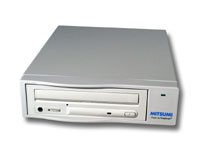
Mitsumi 4802TU Portable
External CD-RW Drive (USB)
Reviewed by
Tachyon
(16 September 99)
|
- The
Tests |
When the PC97 spec was released back in 1996, USB (Universal Serial Bus) was touted as a replacement for the parallel and serial ports on the back of the PC. At that time, hardly anyone heard of USB let alone seen USB devices. Most users just did not know what to do with that 2 rectangular connectors at the back of the PC then. It was only since 1998 when we began to see the appearance of USB devices on the market. Today a whole host of products is available for the USB. This leads us to the review of the Mitsumi USB CD-RW drive. This is certainly a very interesting peripheral as it not only brings portability to the user but is also a storage device. Although for years, parallel port devices offer similar ability, they are often difficult to setup and present a whole host of problems whenever there are conflicts between multiple devices. The parallel port is heavily overloaded for its intended purpose and was not designed to do that. Those days are gone with the arrival of USB as it allows the user to connect up to 127 devices simultaneously (theoretically) although I doubt if anyone has successfully achieved that. Mitsumi has always been well known in the PC peripherals community as a manufacturer of quality products although they are not well known as a consumer brand name. Their products have appeared inside PCs in many forms eg. keyboards, mouse, floppy drives and CD-ROM drives. At first look, the product looks like just any parallel port or SCSI external drive but on closer inspection, one finds a tiny little USB connector instead. It has a built-in power supply so there is no need to carry a power adapter around (it is auto voltage too) and a USB cable is supplied too. |
|
CD-RW Specifications |
||
| Interface | USB Version 1.0 | |
| Discs Acceptable |
CD-DA |
|
| Writing Mode | Disc
at once Track at once Multi-session Packet writing |
|
| Writing Speed | 600KB/s (4X) | |
| Rewriting Speed | 300KB/s (2X) | |
| Reading Speed | 1200KB/s (8X) | |
| Access Time | 200 ms (typical) | |
The Tests
Installation was a breeze and it was just a matter of plugging the cable into the USB port in the PC. Windows immediately detected the drive and the driver installation was just a matter of popping in a floppy into the drive. The other set of software supplied was the CD writer software. CE Quadrat comes as the standard CD writing software. It also installs the packet CD writing software.
The tests that we run on this drive includes writing, rewriting and reading speed. There isn't any tests we can run on the USB with the exception of the hot plug/unplug feature. We ran WinBench CD to get the CD-ROM reading numbers to see how it measures up against other CD-ROM drives.
Test System Configuration
Processor Celeron 366 on MSI-6905 riser card
RAM 128MB PC100 Hyundai SDRAM
Motherboard Intel BX Chipset with Slot-1
Hard Drive Quantum Fireball 6.4 GB
Operating System Windows 98 Second Edition Build 4.10.2222A
Software Used CD WinBench
CD WinBench 99 Results
WinMark 99 Overall (Kbytes/sec) Access Time (milliseconds) 180
CPU Utilization (percent used) 1.72
Transfer Rate:Inner disc (Kbytes/sec) 781
Transfer Rate:Outer disc (Kbytes/sec) 843
The results show that the highest data transfer rate achieved is nowhere near the 8X reading speed that the drive is said to be capable of. This clearly demonstrates the limitation and throughput of the USB interface since at 8X, the maximum data transfer rate should be 1200kbytes/second while the results only shows that the maximum data transfer achieved was 843kbytes/second. This shortfall is attributted to the bandwidth available to the USB. I expect this number to be lower as more USB devices are connected to the bus. In our test configuration, the Mitsumi CD-RW was the only USB device on the bus. This was done on purpose to see if the drive is able reach the highest data transfer rate specified.The results also proved that for a 4X writing and 2X rewriting speed, the data transfer rate on the USB is sufficient to meet those requirements. With clever buffering and a 2MByte cache, successful writing and rewriting at the maximum 4X write and 2X rewrite should be achievable all the time. This is barring any other high bandwidth devices hogging the bus especially when you are writing a CD. Anyone experienced with successful CD writing would advise against doing anything on your PC that could wreck a CD that you are trying to create. In fact, an article at the Adaptec website has a list of things to do and not to do for the successful creation of a CD. The other tip that I would give is to never exceed the CD-R manufacturer's recommendation of writing speed for the disc. Another common mode of failure is the quality of the disc since there is no way for the manufacturer to test the CD-R before it is sold to the consumer. The CD-R manufacturer can only ensure that the coating on the disc is within specification. You can always write slower but never try to exceed the writing speed specifiied since the dyes on the CD-R is only designed for certain write speeds. In my tests, I find that I was able to write at 4X without any problems on discs that were specified 4X writable by the manufacturer. Mitsumi does recommend discs from several CD-R manufacturers for use in its drive.
The CD-RW tests were similar and I was able to erase and reuse my disc several times without any problems. In fact, one of the most demanding tests were the CD-DA tests and I was able to duplicate one of my music CDs without any problems. One other aspect of the software that is mostly ignored by users is the CD-FS or the packet CD writing software.
The USB driver worked flawlessly everytime I plug the drive into the PC. The system doesn't register the drive as long as it is not plugged into the PC. The driver allocates a drive letter the moment the drive is plugged into the USB. I think this is actually quite neat and demonstrates the ability of the USB driver to allocate/mount the drive on the fly.
Game play and video CD playback was also flawless. This certainly shows that the drive is fast enough for the wide variety of tasks performed on CDs.
Conclusion
I find the Mitsumi a reliable and quality product. The USB interface aspect of the product is certainly quite interesting and useful. It is also very portable and I suspect this to be a good selling point. The other point to note is that you do not need to buy an additional interface card like you need to for SCSI. USB is certainly sufficient and fast enough for its intended purpose.
Overall, the Mitsumi is a good and solid product. It is engineered and designed based on sound economic sense. I say this because it doesn't make economic sense to have a higher speed drive using the USB interface. I would recommend such a product for its portability, ease of use and the fuss free USB interface. The drive speed is sufficient for most tasks today and I don't think CDR media capable of 8X or more write speed is going to be any cost effective or reliable real soon now. Unfortunately the drive doesn't come with MacOS drivers and software but an announcement made by Mitsumi recently about a USB CD-RW drive for the iMac may soon remedy that.
If a portable CD-ROM drive with the added functionality of CD-RW is what you are looking for and you don't want to spend the extra money for a higher end SCSI drive, this is just the product to consider.
|
Overall Rating |
|
| Installation | **** |
| Performance | **** |
| Price | *** |
| Software Bundle | *** |
| Build Quality | **** |
| Overall Rating | **** |

Any comments/remarks?
Submit your views to this review here.
This product is provided courtesy of
Richcom Technology (S) Pte Ltd
#03-30 @ Sim Lim Square
Copyright © 1999 by Singapore Hardware Zone. All rights reserved.
None of the above shall be reproduced, copied and/or
modified without the permission of the WebMaster.